Pellet Machine Vibration After Startup: Causes and Checks
News 2026-10-26
A pellet machine that vibrates after startup is not automatically faulty, but it should not be assumed to be a normal startup transient until resonance and a faulty reading have been ruled out. Starting a loaded machine produces a vibration that settles as the die chamber fills and the material reaches a steady flow. A vibration that settles within the time recorded at the normal baseline is normal. A vibration that starts at startup and does not settle within that time, or that grows while the machine runs, is the case that needs diagnosis.
The timing is the first useful observation. Vibration that appears at the first rotation and continues points to a mechanical or mounting cause, because the material has not yet had time to affect the machine. Vibration that appears as material enters the die chamber points to a feed or material cause. Vibration that appears after the machine has run for a while points to a progressive cause such as wear, loosening, or a partial die blockage.
This article covers how to tell a startup vibration from a fault, how vibration and noise differ, how to measure the vibration against a baseline, how mounting, coupling, roller, and feed condition each show up, how to identify resonance, when to stop rather than wait, and what to record before contacting a supplier.
Startup Vibration or Fault
The first decision is whether the vibration is the normal startup transient or a fault.
| What you observe | Likely cause | First check |
|---|---|---|
| Vibration at first rotation, settles within the baseline settling time | Normal startup transient as the rotor and the die come up to speed | Confirm the vibration reduces within the recorded baseline time |
| Vibration at first rotation, does not settle within the baseline time | Mechanical or mounting fault | Mounting, coupling, bearings, roller condition |
| Vibration appears as material enters the die chamber | Feed or material cause | Feed rate, moisture, particle size |
| Vibration appears after a period of normal running | Progressive cause | Roller wear, bearing, partial die blockage, loosening |
| Vibration only at one speed | Resonance | Mounting, foundation, operating speed |
| Vibration with a new noise or a temperature rise | Mechanical fault | Bearings, coupling, die chamber |
The starting behaviour of the machine should be recorded when it is running normally, so that a later startup can be compared with it. A vibration that is new compared with the recorded startup is a change, and a change is what matters.
Vibration and Noise Are Different Signals
Vibration and noise often appear together, but they are measured differently and can point to different things.
- Vibration is continuous motion, measured at the bearing housing or the frame in velocity or acceleration. It is the more reliable indicator of a mechanical fault.
- Noise travels through the air and through the structure. It can be produced by a component that is not vibrating significantly itself, such as a belt squeal or an electrical hum.
- Resonance can make a small vibration produce a loud noise and a high vibration reading at a specific operating condition, without a progressive mechanical fault.
When vibration and noise appear together at the same location, the cause is usually mechanical. When noise appears without measurable vibration at the frame, check for belt slip, electrical noise, or resonance before assuming an internal mechanical fault.
How to Measure the Vibration Against a Baseline
A vibration reading without a measurement point, a direction, and a baseline is not useful for diagnosis.
| Measurement item | What to record | Why it matters |
|---|---|---|
| Measurement point | Bearing housing, frame, foundation, motor, gearbox | Locates the source |
| Direction | Horizontal, vertical, axial | Separates imbalance from misalignment and looseness |
| Unit | Velocity (mm/s) for general condition, acceleration for bearing faults | Different units diagnose different faults |
| Machine condition | Load, speed, material, die condition | Confirms the reading is comparable with the baseline |
| Baseline | The reading recorded at the same point and direction when the machine was running normally | Confirms whether the vibration is new |
Vibration limits must come from the machine manual and the supplier documentation for the specific model. A ring die machine and a flat die machine with similar output do not have the same vibration signature, and a machine on a rigid foundation responds differently from a machine on a flexible frame or a mobile mounting. If no baseline exists, record one at the next normal run before the next fault.
How to Identify Resonance
Resonance is a vibration that appears only at a specific speed or load and is not caused by a progressive fault.
- Change the machine speed slightly and observe whether the vibration drops sharply. A sharp drop at a speed away from the original point indicates resonance.
- Change the load and observe whether the vibration follows the load or the speed. Resonance follows speed, not load.
- Check the foundation and frame for a natural frequency that matches the operating speed.
- A resonance that appears only at one speed and is not accompanied by noise or a temperature rise is usually a mounting or foundation issue, not an internal mechanical fault.
Do not treat a resonance as a bearing fault. Replacing bearings will not correct a resonance that comes from the foundation or the mounting.
Checks Before the Die Chamber Is Filled
These checks apply in the first minutes, before material reaches the die chamber. At this stage, the material cannot be the cause, so a vibration that is present now points to the machine.
| Check | What to look for | What it tells you |
|---|---|---|
| Mounting and anchor bolts | Loose bolts, movement of the frame, machine not level | A mounting or foundation problem |
| Coupling | Insert wear, bolt tightness, visible misalignment | A drive fault at the coupling |
| Belt, where fitted | Tension, alignment, glazing | A belt drive fault |
| Roller free rotation | A roller that does not rotate freely, with the machine locked out | A roller or roller bearing fault |
| Bearing temperature and noise | New noise, temperature rise | A bearing fault |
| Guards and covers | Loose guard or fastener | A loose component |
A vibration that is present before the die chamber is filled, and that changes when the machine is touched, usually points to a mounting or a guard problem, but a loose component near the guard can produce the same response, so the location and the vibration reading must be checked together. A vibration that is present before the die chamber is filled and that follows rotation speed usually points to a coupling, a bearing, or a roller.
Checks After the Die Chamber Is Filled
Once material reaches the die chamber, the feed and the material can produce a vibration that has nothing to do with a mechanical fault.
| Check | What to look for | What it tells you |
|---|---|---|
| Feed rate stability | Fluctuation, bridging, surge | A feed cause |
| Moisture at the mill inlet | Change from the normal value | A material cause |
| Particle size | Change from the normal value, oversized particles | A material cause |
| Die hole condition | Partial blockage, uneven wear | A die cause |
| Motor current | Above, within, or below the manual range | Separates a feed cause from a mechanical cause |
| Pellet quality | Soft pellets, uneven pellets, excessive fines | A material or die cause |
A vibration that appears only after the die chamber is filled, and that clearly reduces or disappears when the feed is reduced, is a feed or material cause. A vibration that reduces only slightly when the feed is reduced, or that continues with the feed stopped and follows rotation speed, is a mechanical cause, and the motor current and pellet quality should be checked together with the vibration reading.
Mounting and Foundation
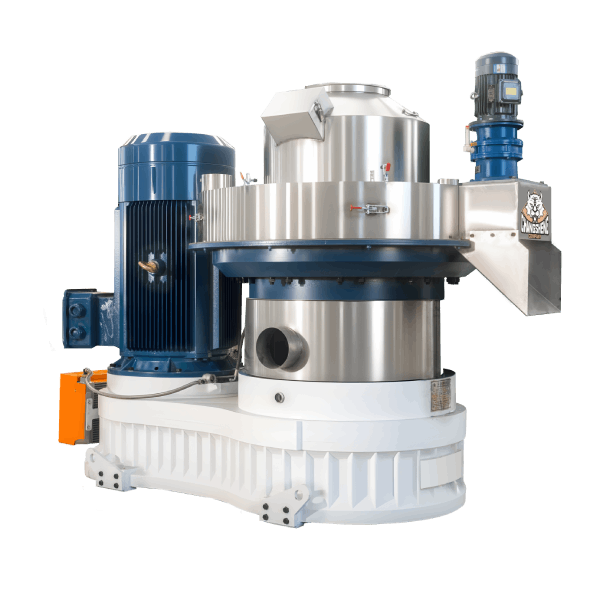
Why it vibrates: A machine that is not sitting level, or whose anchor bolts are loose, transmits its normal vibration into the frame and the floor. The vibration is often low frequency and is worse at certain speeds. A machine on a foundation that has moved or settled produces the same result.
What to check: Machine level against the manual requirement. Anchor bolt tightness against the manual torque specification. Foundation condition for cracks or movement.
What to do: Tighten the bolts to the manual specification. Level the machine. Repair a damaged foundation. Do not continue running on a loose foundation, because the vibration accelerates wear on the bearings and the die.
Coupling and Belt
Why it vibrates: A worn coupling insert, a loose coupling bolt, or a misaligned coupling produces a vibration that follows rotation speed and is worse under load. A loose or misaligned belt produces a vibration and a noise that change with load.
What to check: Coupling condition and insert wear. Bolt tightness. Alignment against the manual tolerance. Belt tension and alignment.
What to do: Replace the worn coupling or insert. Realign to the manual tolerance. Adjust belt tension and alignment. Do not continue running a misaligned drive.
Rollers and Die
Why it vibrates: Uneven roller wear, a roller that does not rotate freely, or a die with uneven hole condition produces a vibration that follows rotation speed. The vibration is often accompanied by a change in output and pellet quality.
What to check: Roller free rotation with the machine locked out. Roller surface condition. Roller clearance against the manual. Die hole condition.
What to do: Replace worn or damaged rollers. Restore clearance to the manual specification. Replace a die with uneven hole condition.
Bearings
Why it vibrates: A bearing with developed clearance or a damaged raceway produces a vibration that increases with load and is often accompanied by a temperature rise and a noise. An early-stage fault may show vibration before it shows a temperature rise, which is why the vibration reading and the temperature reading should be recorded together.
What to check: Bearing temperature against the manual. Vibration at the bearing housing. Noise localised with a stethoscope.
What to do: Stop the machine and inspect. Replace the bearing according to the manual.
Feed and Material
Why it vibrates: An uneven feed rate, a moisture change, or a particle size change produces a vibration that appears after the die chamber is filled and that changes with the feed. The vibration is usually accompanied by a change in motor current and in pellet quality.
What to check: Feed rate stability. Moisture at the mill inlet. Particle size after grinding.
What to do: Stabilise the feed. Correct the moisture and the particle size. A vibration that continues after the feed is stabilised is not a feed problem.
What to Record at Startup
A record of the startup makes the next comparison possible. The baseline should be recorded at each normal run, and the record should be kept with the machine maintenance log.
| Item | What to record |
|---|---|
| Vibration at first rotation | Present or absent, direction, and unit |
| Time to settle | How long the vibration takes to reduce, compared with the previous baseline |
| Vibration after the die chamber is filled | Present or absent, and how it changes with feed |
| Motor current at startup and at normal load | Value against the manual range |
| Bearing temperature at startup and at normal load | Value against the manual range |
| Noise | New or unchanged compared with the normal startup |
| Operating speed | The speed at which the vibration appears or settles |
When to Stop Rather Than Wait
Stop the machine when any of the following applies.
| Condition | Action |
|---|---|
| Vibration that does not settle within the baseline time at operating speed | Stop and inspect mounting, coupling, and bearings |
| Vibration with a new noise or a temperature rise | Stop immediately |
| Vibration with visible movement of the frame or foundation | Stop and inspect anchor bolts and foundation |
| Vibration with motor current above the manual range | Reduce feed rate first. If the vibration and current do not fall, stop |
| Vibration that grows while the machine runs | Stop and inspect for a progressive fault |
Restart After a Vibration Fault
Confirm the following before returning to normal feed rate.
| Acceptance item | What to confirm |
|---|---|
| Startup vibration | Settles within the baseline time recorded at the previous normal run |
| Vibration at normal load | No new or increasing vibration compared with the baseline |
| Motor current | Stable and within the manual range |
| Bearing temperature | Stable and within the manual range |
| Mounting and coupling | Secure and aligned |
| Die and roller condition | No damage, no embedded material |
| Pellet quality | Consistent with the normal production baseline |
If the vibration returns at reduced feed rate, stop and check the mounting, the coupling, the rollers, and the bearings before increasing feed.
Spare Parts to Hold for Vibration Faults
Whether the mounting, coupling, bearings, die, or rollers need replacement depends on the inspection result and the limits in the machine manual and the supplier documentation. Anchor bolt tightness, coupling wear, bearing temperature and noise, die hole condition, and roller surface condition are the criteria. The limits are not universal and must come from the machine manual and the component supplier.
| Spare part | Why it is needed after a vibration fault |
|---|---|
| Coupling and coupling insert | Wear or misalignment during the event |
| Bearings | Heat or load exposure during the event |
| Die and rollers | Damage from a loose component or metal-to-metal contact |
| Anchor bolts and fasteners | Loosening or damage from the event |
Frequently Asked Questions
Is vibration at startup normal?
A vibration that settles within the baseline time as the machine reaches operating speed and the die chamber fills is normal. A vibration that does not settle within that time, or that grows, is not normal and should be diagnosed.
How long should the startup vibration last?
The settling time depends on the machine and the load, and it should come from the baseline recorded when the machine was running normally. A startup that takes longer than the baseline is a change.
Can a loose anchor bolt cause vibration?
Yes. A loose anchor bolt or an unlevel machine transmits normal vibration into the frame and the floor. The check is the bolt tightness and the machine level against the manual.
How do I tell a feed vibration from a mechanical vibration?
A feed vibration clearly reduces or disappears when the feed is reduced, and it follows the material condition. A mechanical vibration continues with the feed stopped and follows rotation speed. The motor current and pellet quality separate the two.
When should I stop the machine instead of waiting?
Stop when the vibration does not settle within the baseline time, when it is accompanied by a new noise or a temperature rise, when the frame or foundation moves, or when the vibration grows while the machine runs.
Get Diagnostic Support for Your Pellet Machine
Send the machine model, the vibration measurement point, direction and unit, whether the vibration appears before or after the die chamber is filled, the motor current and bearing temperature at startup and at normal load, the mounting and coupling condition, and the recorded startup baseline. A diagnostic review can be prepared against the machine and the operating conditions rather than against a general checklist.
Maintenance parameters, torque specifications, temperature limits, alignment tolerances, vibration limits, and acceptance criteria in this article must be confirmed against the machine manual and the die, bearing, coupling, and drive supplier documentation. This article does not provide universal values for these items.